Never miss a Google Tag Manager update: release notes to Slack with Apps Script
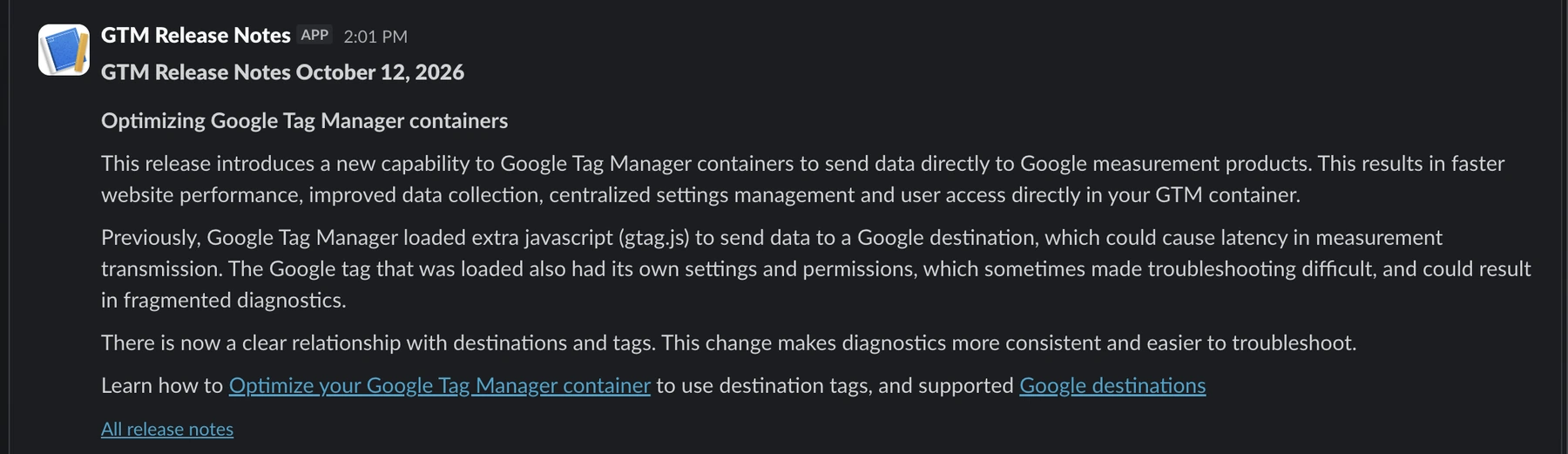
Google Tag Manager changes more often than most people notice, and some of those changes touch live tracking. Here is the small, free setup that posts every new GTM release note to a Slack channel, in full and formatted, a few hours after Google publishes it.
Why GTM release notes deserve attention
For a long time, I heard about GTM updates the same way most analysts do: a LinkedIn post a few days later, if at all. That works for UI tweaks. It does not work for changes that alter how a container behaves in production.
Two recent examples from the official release notes show why:
- In October 2026, Google changed how
gtag('config')commands behave next to GTM containers. Config commands now surface in the data layer asgtag.configevents, which means tags on wildcard custom event triggers can start firing on them. If you only learn about that weeks later, you are cleaning up inflated numbers. - A few days later, GTM containers gained the ability to send data directly to Google destinations without loading an extra
gtag.js. That is good news for performance, but it also changes how diagnostics and settings relate to your tags.
Neither is dramatic on its own. But in a setup with many containers, “someone will notice eventually” is not a process. I wanted every new entry in front of the team, with a link, on the day it appears.
The approach: a scheduled Apps Script and a Slack webhook
The whole thing is a single Google Apps Script file of about 150 lines. No server, no hosting, no cost. It works in four steps:
- A time-driven trigger runs the script every six hours.
- The script fetches the official release notes page and splits it into entries. Every date heading starts a new release, and its content runs until the next date heading.
- It compares the newest date with the last date it has seen, which it keeps in Script Properties.
- Every newer entry is converted from HTML to Slack formatting and posted through an Incoming Webhook, oldest first.
Apps Script is a good fit because it already has everything this job needs: an HTTP client (UrlFetchApp), a small key-value store (PropertiesService) and a scheduler (time-driven triggers). All of it runs on Google’s infrastructure with your Google account.
The Slack side
On the Slack side you need an app with the Incoming Webhooks feature turned on, connected to the channel you want to post to. Slack then gives you a webhook URL. Anything that sends JSON to that URL appears as a message in the channel.
Plan for approval in company workspaces. Many organizations require an admin to approve new Slack apps, even simple webhook apps. Request it early and explain what the app does and that it only posts, it never reads messages.
Treat the webhook URL like a password. Anyone who has it can post to your channel. Keep it out of the code and store it in Script Properties instead.
The script
This is the script I run. Paste it into a new Apps Script project and follow the setup steps below.
/**
* GTM Release Notes -> Slack
* Google Apps Script (script.google.com)
*
* Setup:
* 1) Project Settings > Script Properties > add SLACK_WEBHOOK_URL
* 2) Run testLatest() -> posts the latest note to Slack (format check)
* 3) Run setupTrigger() once -> checks every 6 hours
*/
const CONFIG = {
URL: 'https://support.google.com/tagmanager/answer/4620708?hl=en',
BASE: 'https://support.google.com',
CHECK_EVERY_HOURS: 6,
};
/** Main function called by the trigger */
function checkReleaseNotes() {
const props = PropertiesService.getScriptProperties();
const webhook = getWebhook_();
const entries = fetchEntries_();
const lastSeen = props.getProperty('LAST_SEEN_DATE');
if (!lastSeen) {
// First run: don't spam past notes, just store the latest date
props.setProperty('LAST_SEEN_DATE', entries[0].date);
return;
}
const idx = entries.findIndex(function (e) { return e.date === lastSeen; });
const fresh = idx === -1 ? [entries[0]] : entries.slice(0, idx);
// Post from oldest to newest
fresh.reverse().forEach(function (e) { postToSlack_(webhook, e); });
props.setProperty('LAST_SEEN_DATE', entries[0].date);
}
/** Manual test: posts the latest release note immediately */
function testLatest() {
postToSlack_(getWebhook_(), fetchEntries_()[0]);
}
/** Trigger setup (run once) */
function setupTrigger() {
// Seed the baseline now so nothing published before the first run is skipped
PropertiesService.getScriptProperties()
.setProperty('LAST_SEEN_DATE', fetchEntries_()[0].date);
ScriptApp.getProjectTriggers().forEach(function (t) {
if (t.getHandlerFunction() === 'checkReleaseNotes') ScriptApp.deleteTrigger(t);
});
ScriptApp.newTrigger('checkReleaseNotes')
.timeBased()
.everyHours(CONFIG.CHECK_EVERY_HOURS)
.create();
}
/* ---------------- helpers ---------------- */
function getWebhook_() {
const w = PropertiesService.getScriptProperties().getProperty('SLACK_WEBHOOK_URL');
if (!w) throw new Error('Missing script property: SLACK_WEBHOOK_URL');
return w;
}
function fetchEntries_() {
const res = UrlFetchApp.fetch(CONFIG.URL, {
muteHttpExceptions: true,
headers: { 'Accept-Language': 'en-US,en' },
});
if (res.getResponseCode() !== 200) throw new Error('HTTP ' + res.getResponseCode());
const entries = parseEntries_(res.getContentText());
if (!entries.length) throw new Error('Could not parse release notes, page structure may have changed');
return entries;
}
/** Each <h3>Date</h3> is one release; its content runs until the next h3 */
function parseEntries_(html) {
const h3Re = /<h3[^>]*>([\s\S]*?)<\/h3>/gi;
const dateRe = /^[A-Z][a-z]+ \d{1,2}, \d{4}$/;
const heads = [];
let m;
while ((m = h3Re.exec(html)) !== null) {
const text = cleanText_(m[1]);
if (dateRe.test(text)) heads.push({ date: text, start: m.index, bodyStart: h3Re.lastIndex });
}
return heads.map(function (h, i) {
const end = i + 1 < heads.length ? heads[i + 1].start : h.bodyStart + 20000;
return { date: h.date, html: html.substring(h.bodyStart, end) };
});
}
/** HTML -> Slack mrkdwn */
function toSlackMrkdwn_(html) {
const L = '\u0001', R = '\u0002'; // link placeholders (protect links from tag stripping)
let s = html;
s = s.replace(/<a[^>]*href="([^"]+)"[^>]*>([\s\S]*?)<\/a>/gi, function (_, href, text) {
href = decode_(href);
if (href.charAt(0) === '/') href = CONFIG.BASE + href;
return L + href + '|' + cleanText_(text) + R;
});
s = s.replace(/<h4[^>]*>([\s\S]*?)<\/h4>/gi, function (_, t) { return '\n*' + cleanText_(t) + '*\n'; });
s = s.replace(/<(strong|b)[^>]*>([\s\S]*?)<\/\1>/gi, '*$2*');
s = s.replace(/<code[^>]*>([\s\S]*?)<\/code>/gi, '`$1`');
s = s.replace(/<li[^>]*>/gi, '\n• ');
s = s.replace(/<br\s*\/?>/gi, '\n');
s = s.replace(/<\/(p|ul|ol|div)>/gi, '\n\n');
s = s.replace(/<[^>]+>/g, '');
s = decode_(s);
// Escape for Slack, then restore link placeholders
s = s.replace(/&/g, '&').replace(/</g, '<').replace(/>/g, '>');
s = s.split(L).join('<').split(R).join('>');
return s.replace(/[ \t]+/g, ' ').replace(/ *\n */g, '\n').replace(/\n{3,}/g, '\n\n').trim();
}
function postToSlack_(webhook, entry) {
const title = 'GTM Release Notes ' + entry.date;
const body = toSlackMrkdwn_(entry.html);
const chunks = body.match(/[\s\S]{1,2900}/g) || ['(no content)']; // section text limit is 3000
const blocks = [{ type: 'header', text: { type: 'plain_text', text: title } }]
.concat(chunks.map(function (c) { return { type: 'section', text: { type: 'mrkdwn', text: c } }; }))
.concat([{ type: 'context', elements: [{ type: 'mrkdwn', text: '<' + CONFIG.URL + '|All release notes>' }] }]);
const res = UrlFetchApp.fetch(webhook, {
method: 'post',
contentType: 'application/json',
payload: JSON.stringify({ text: title, blocks: blocks }),
muteHttpExceptions: true,
});
if (res.getResponseCode() !== 200) throw new Error('Slack error: ' + res.getContentText());
}
function cleanText_(s) {
return decode_(s.replace(/<[^>]+>/g, '')).replace(/\s+/g, ' ').trim();
}
function decode_(s) {
return s
.replace(/ /g, ' ')
.replace(/"/g, '"')
.replace(/'|'/g, "'")
.replace(/</g, '<')
.replace(/>/g, '>')
.replace(/&#(\d+);/g, function (_, n) { return String.fromCharCode(+n); })
.replace(/&#x([0-9a-f]+);/gi, function (_, n) { return String.fromCharCode(parseInt(n, 16)); })
.replace(/&/g, '&');
}Setting it up step by step
- Go to script.google.com and create a new project.
- Paste the script into
Code.gsand save. - Open Project Settings → Script Properties and add
SLACK_WEBHOOK_URLwith your webhook URL. - Run
testLatest(). It posts the most recent release note straight to Slack, so you can check the formatting. Apps Script will ask for permission to make external requests the first time. - Run
setupTrigger()once. It remembers the latest release date as a starting point, removes any older copies of the trigger and schedulescheckReleaseNotes()every six hours.

checkReleaseNotes, and nothing else to maintain.Things I learned along the way
Parsing a help page is fragile, so fail loudly
There is no official feed for these release notes, so the script reads the HTML of the help page. If Google redesigns that page, the parser may find nothing. The worst outcome would be a script that silently stops working. That is why fetchEntries_() throws an error when the request fails or no entries can be parsed. A failing trigger shows up in the Executions log, and Apps Script can email the owner about failed runs, so a broken parser does not go unnoticed.
Release notes are not Slack-ready
The help page is HTML, and Slack uses its own markup. The script converts headings, bold text, code, lists and links. Links need special care: they are swapped for placeholders before the remaining tags are stripped, then restored in Slack’s <url|text> format. Relative links on the help page are turned into absolute ones, so they still work in Slack.
Respect Slack’s limits
A single text section in a Slack Block Kit message can hold up to 3,000 characters, and some release notes are longer than that. The script splits long notes into several sections, so nothing gets cut off or rejected.
Seed the state before the first run
Without a starting point, the first run would have nothing to compare against. setupTrigger() stores the current latest date right away, so only notes published after setup are posted, and the channel is not flooded with years of history.
Know the trade-off of tracking dates
The script remembers the date of the newest release, not every individual note. That keeps it simple and covers how Google publishes almost every time. The one case it would miss is Google adding a new note under a date that already exists on the page. For release notes that appear a few times a month, I am happy with that trade-off.
What changed for us
The biggest effect is not speed, it is the conversation. A new entry now arrives as a Slack message with its own thread, and the question “does this affect our setup?” gets answered there, on the same day, by the people who know the containers. For changes like the gtag.config event, that is the difference between a quick check of wildcard triggers and a surprise in next month’s report.